



Ahead of Time (AOT)
Introduction
Ahead-of-time (AOT) compilation in C# is an interesting feature that transforms your intermediate language (IL) into native machine code without the need to have a Just-In-time (JIT) compiler.
There are several advantages to choosing such options such as faster startup times, less memory consumption, and easier deployment to the destination since there is no need to install .Net runtime.
Releasing your application as Native AOT results in a self-contained application that has undergone ahead-of-time (AOT) compilation into native code. Native AOT applications offer swifter startup times and demand fewer memory resources. These applications can be executed on systems lacking the .NET runtime installation.
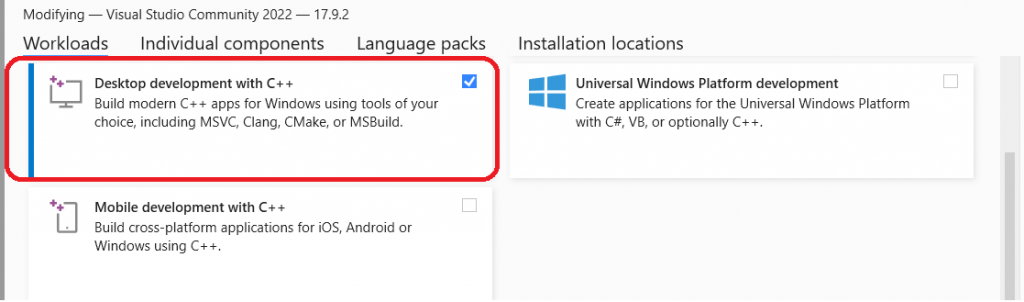
If you are using Visual Studio 2022 Community Edition, run the Visual Studio Installer, then go to Workloads tab search for “Desktop development with C++” and make sure the option is selected.

The advantages of Native AOT are particularly prominent when dealing with workloads that involve a high number of deployed instances, such as cloud infrastructure and large-scale services. It’s worth noting that Native AOT deployment is currently in the preview stage for ASP.NET Core 8.0.
The Native Ahead-Of-Time (AOT) deployment model harnesses the capabilities of an ahead-of-time compiler to meticulously transform Intermediate Language (IL) into optimized native code throughout the publishing phase. Distinctively, applications built using the Native AOT approach do not depend on the conventional just-in-time (JIT) compilation process at runtime.
This unique characteristic renders them exceptionally apt for deployment in constrained or highly regulated environments where JIT compilation may be either prohibited or impractical. Furthermore, Native AOT applications are intricately designed and customized for specific runtime ecosystems, such as Linux x64 or Windows x64 platforms, mirroring the deployment strategies of self-contained applications. This precision in targeting specific platforms ensures optimal performance and compatibility, making Native AOT a preferred choice for developers aiming for efficiency and reliability in restricted deployment scenarios.

Project
Consider the following quick sort algorithm where 10 million random values are sorted. It will be tested with AOT activated as well as AOT deactivated and the execution time will be compared to find out the potential gain (if any) of the AOT feature.
using System;
using System.Diagnostics;

class QuickSort
{
    public static void Run()
    {
        Stopwatch sw = new Stopwatch();
        sw.Start();

        int[] arr = new int[10000000];
        FillAndSuffleArray(arr);

        QuickSortAlgorithm(arr, 0, arr.Length - 1);
        sw.Stop();
        TimeSpan ts = sw.Elapsed;

        Console.WriteLine("Time: " + ts.TotalSeconds);
    }

    static void QuickSortAlgorithm(int[] arr, int left, int right)
    {
        if (left < right)
        {
            int partitionIndex = Partition(arr, left, right);

            QuickSortAlgorithm(arr, left, partitionIndex - 1);
            QuickSortAlgorithm(arr, partitionIndex + 1, right);
        }
    }

    static int Partition(int[] arr, int left, int right)
    {
        int pivot = arr[right];
        int partitionIndex = left;

        for (int i = left; i < right; i++)
        {
            if (arr[i] <= pivot)
            {
                Swap(arr, i, partitionIndex);
                partitionIndex++;
            }
        }

        Swap(arr, partitionIndex, right);
        return partitionIndex;
    }

    static void Swap(int[] arr, int i, int j)
    {
        int temp = arr[i];
        arr[i] = arr[j];
        arr[j] = temp;
    }

    private static void FillAndShuffleArray(int[] arr){
        int max = arr.Length;
        for(int i = 0; i < arr.Length; i++){
            arr[i] = max - i;
        }
        Random random = new Random();
        for(int i = 0; i < arr.Length-1; i++){
            int r = random.Next(i+1, arr.Length-1);
            int rv = arr[r];
            arr[r] = arr[i];
            arr[i] = rv;
        }

    }
}
Activate AOT
To activate AOT, edit your .csproject file and make sure PublishAot is set to true, as you can see below:
<Project Sdk="Microsoft.NET.Sdk">

  <PropertyGroup>
    <OutputType>Exe</OutputType>
    <TargetFramework>net8.0</TargetFramework>
    <ImplicitUsings>enable</ImplicitUsings>
    <Nullable>enable</Nullable>
    <PublishAot>true</PublishAot>
     <AllowUnsafeBlocks>true</AllowUnsafeBlocks>
  </PropertyGroup>

</Project>
Outcome
AOT : true
dotnet publish -c Release
Time: 1.271 second
AOT: false
Time: 1.32 second
The gain might seem tiny, only 0.03 second!
However, when you are working towards high performance, you can’t expect huge improvement since you have supposedly already optimized for performance. In high-frequency trading, for example, gaining 30 milliseconds is enormous. Not being able to do so from the start would not be seen in a keen eye.
Conclusion
High performance is a valuable attribute in software development, but it’s not universally necessary for all applications. Pursuing peak performance often demands significant time and effort, which may not always justify the benefits. In many cases, the gain in performance should align with the specific needs and expectations of the application’s users. In essence, the pursuit of high performance should be balanced against the practical needs and constraints of each project.