


Secret of the Super Fast SearchValues Type
Starting .net8 there is a new and interesting type that is specialized in fast searching for very specific scenarios.
This type is super useful, Microsoft is using it in all of the .net code base and libraries such as Asp.net Core, network and cryptography libraries etc…
Every time you need to check whether a string, whether input string, or gotten from the network or database contains legal characters you need to check every character usually using calls to method such Contains().
Of course you might not care a lot about the performance hit if speed is not of an essence.
However imagine you are a very successful ecommerce website and you are processing thousands or millions requests per minute. It is in your interest to make your service as responsive and as fast as you could. Wasting milliseconds or even microseconds on the main processing chain will cause things to add up and delays will affect your business.
Why is it fast?
At it is core the speed of the SearchValue type stems from the fact that it maps characters to bits, then the search is reduces to bitwise operations.
This is at the algorithmic level, which is very important aspect. Add to that the type uses some technical tricks such as inlining and optimized access operations to speed up the processing even further.
The algorithm
As explained above, the algorithm is about bitmapping characters so that finding any of them becomes a matter of bitwise operation that runs very fast.
PS Note that there is not a single implementation, but several ones that matches different cases and scenarios. For example if the scenario is about byte sized value or ASCII characters there is special implementation for them, and so on… The real implementation is usually determined by the SearchValues.Create() method.
Let’s focus on the ASCII characters which means the value of each char does not exceed 255 (the maximum of a byte).
The question to be asked, is how to map 256 values (0 till 255) to a sequence of bits?
The answer is rather straight forward. Construct an array of 8 uint (unsigned integer) each one consisting of 32 bits. This array contains a total of 256 bits (which is what is needed) spread on 8 uint, then do whatever operation to set the bit which number or position in the sequence is equivalent to the value you want to map.
For example, if you need to map the value of 100, you need the set the 100th bit in the array to 1, this can be done using the following method:
private fixed uint _values[8];

void Set(int c)
{
    Debug.Assert(c < 256);
    // divide the value by 32 (size of uint in bits)
    // this will give which of the 8 uint in the array this value should be placed in
    uint targetElem = (uint)(c >> 5);
    // this will determine which bit in the unit should be set.
    // a feature of 1u << c is the same as 1u << (c%32), so even if c is greater than c
    // it still works.
    uint targetBit = 1u << c;
    // get the target element and bitwise-or with the targetBit to set the bit to 1
    _values[targetElem] |= targetBit;
}
The code above performs two simple operations. The aim is to find the position of the bit that corresponds to the value of the parameter c.
Since the _values is an array of 32-bit (uint) elements, the code at line 8 calculates which element the parameter c should go to.
This is done by doing an integer division of c by 32. For example the value 120 should be in element 3 (120/32).
Once the element is found, line 12 computes which bit the value should go to, this done by doing bitwise shift by the value itself. In our example this will be 1u << 120.
If this seems strange, since there are 32 bits, how could a bit be shifted by 120! Actually this feature is beneficial as it gives the appearance as if the shift is looping several times, but in reality it is equivalent to 1u << (120%32) = 1u << 24. So the targetBit will be the #24 in the element #7.
To finish this, all what is remaining is to SET the bit 25 in element 7 to 1. This is done on line 14 via a bitwise-or.
The image below illustrates the whole operation and shows how the whole of 256 ASCII characters can be mapped to an array of 8×32 = 256 bits.
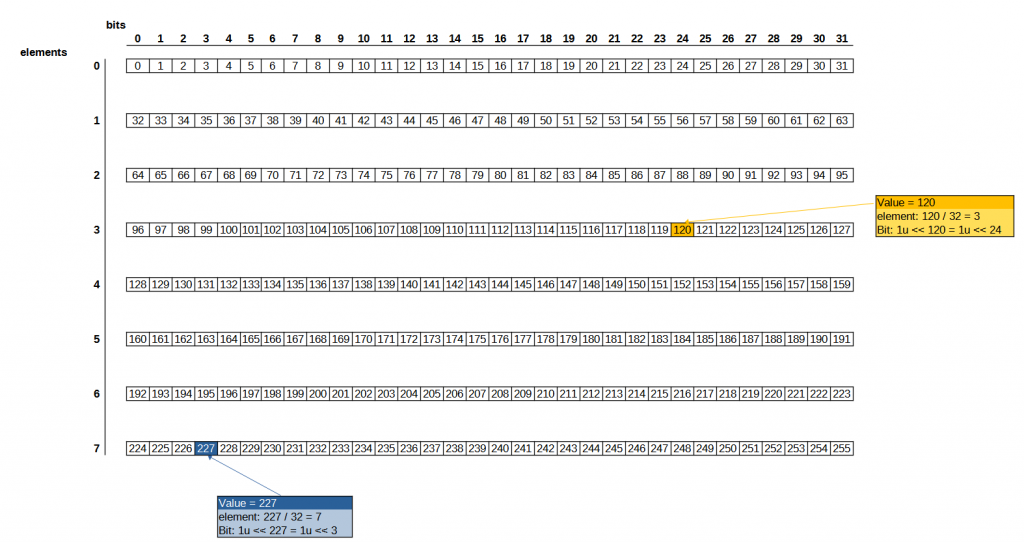
So now that all the values are being mapped, next thing to do is how to verify that a value exists or not.
The procedure is almost the same, for a given value the algorithm computes the element and the bit as shown previously, then checks if the bit is set (bit = 1).
If the bit is set, then the value exists in the map, if it is not (bit = 0) then the value does not exist in the map.
The code below shows the implementation.
public bool Contains(int b)
{
    // computes the target element, as seen above
    uint targetElem = (uint)(b >> 5);
    // computes the target bit as seen above
    uint targetBit = 1u << b;
    // check if the bit at targetElem and targetBit is set
    return (_values[targetElem] & targetBit) != 0;
}
Code & Benchmark
Hopefully the SearchValue explanation was clear enough.
This section will focus on benchmarking the .net8 SearchValue versus a custom implementation using a simple bit mapping technique, as well as String.Contains and a binary search of an array.
The Code checks if a string contains only alpha-numerical characters (including space).
using BenchmarkDotNet.Attributes;
using System.Buffers;

namespace ConsoleSearchValue
{
    public class SearchValueExample
    {
        // the legal set of chars
        const string ALLPHA_NUM = "ABCDEFGHIJKLMNOPQRSTUVWXYZabcdefghijklmnopqrstuvwxyz0123456789 ";

        // the SearchValues type of .net8
        static SearchValues<char> searchValues = SearchValues.Create(new ReadOnlySpan<char>(ALLPHA_NUM.ToCharArray()));

        // the custom implementation of SearchValues
        static CustomSearchValues customSearchValues = new CustomSearchValues(ALLPHA_NUM);

        // the array to be used in binary SearchValues
        static char[] sortedArray;

        // the string to verify. It contains non-alphaNumeric at the end
        static string stringToSearch = "Lorem ipsum dolor sit amet consectetur adipiscing elit sed do eiusmod tempor incididunt ut labore et dolore magna aliqua 2024!";

        // at the start sort the array of legal chars, to be used in a binary search test
        public SearchValueExample()
        {
            sortedArray = ALLPHA_NUM.ToCharArray();
            Array.Sort<char>(sortedArray);
        }


        // use of .net8 searchValues
        [Benchmark]
        public bool TestUsingSearchValues()
        {
            return stringToSearch.AsSpan().IndexOfAnyExcept<char>(searchValues) == -1;
        }


        // use of custom implementation of SearchValues
        [Benchmark]
        public bool TestUsingCustomSearchValues()
        {
            foreach (var c in stringToSearch)
            {
                if (!customSearchValues.Contains(c))
                {
                    return false;
                }
            }

            return true;
        }

        // use of String.Contains() method
        [Benchmark]
        public bool TestUsingStringContains()
        {
            foreach (var c in stringToSearch)
            {
                if (!ALLPHA_NUM.Contains(c))
                {
                    return false;
                }
            }

            return true;
        }

        // use of BinarySearch test
        [Benchmark]
        public bool TestUsingBinarySearch()
        {
            foreach (var c in stringToSearch)
            {
                int pos = Array.BinarySearch(sortedArray, c);
                if (pos < 0)
                {
                    return false;
                }
            }

            return true;
        }
    }
}
After running the benchmark, it shows without surprise that the .net8 SearchValues implementation is way more performant than the others.
Next comes the custom implementation of SearchValues as shown in previous sections.
Note that the custom implementation does not make any use of code optimization such as inlining and other stuff.
Then comes the String.Contains(), which is rather surprising as one would think that this is O(n) linear algorithm while the BinarySearch is O(log(n)) algorithm and should be better.

Finally, it is safe to say that whenever the opportunity arises, you should not shy away from using SearchValues as it beats all other methods and it is a good idea to make it a habit to use it.